

— Products —
 Consumer hotline +8618073152920
WhatsApp:+8615367865107
Address:Room 102, District D, Houhu Industrial Park, Yuelu District, Changsha City, Hunan Province, China
Handheld Tester
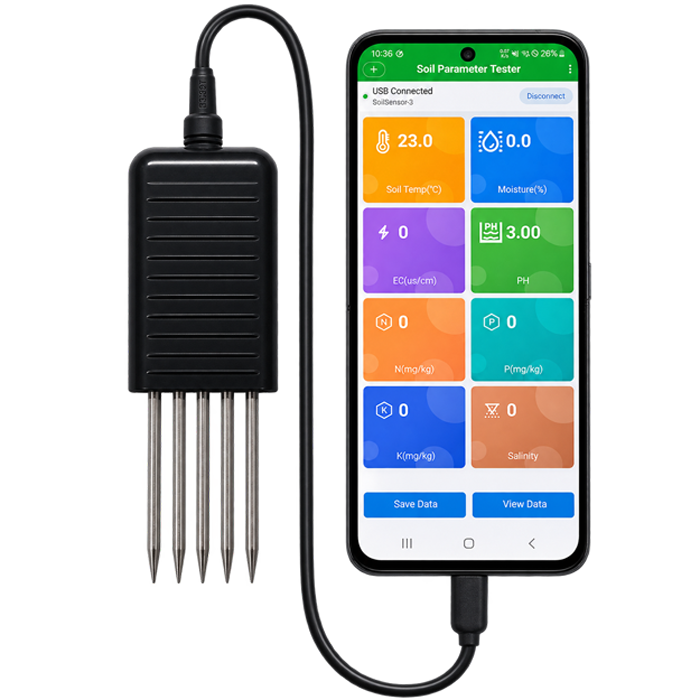
USB Type-C 8-in-1 soil tester for Android OTG phones measures moisture, temperature, EC, pH and estimated NPK, with records and CSV export.
Tel/WhatsApp:+8615367865107
Email:Arvin@niubol.com +Nearly 100 partner companies in more than 75 countries. We are committed to providing high-quality, practical products to meet your needs and help you solve problems. Our products comply with international standards and are certified with ISO, CE and RoHS.Product Details
Check soil conditions on an Android phone—without carrying a separate handheld display. The NiuBoL USB 8-in-1 Soil Parameter Tester is a portable, cable-connected soil testing device for on-site checks in greenhouses, farms, gardens and trial plots. Insert the sensor probes into soil, connect the USB Type-C data cable to a compatible Android phone with USB OTG, and view eight parameters in the companion app.
The app provides real-time readings, measurement notes, a local history log and CSV export. It is designed for quick spot checks and repeatable comparisons between sampling locations, rather than replacing full laboratory soil analysis.
At a glance: 8 on-screen parameters · USB Type-C 5 V power and data · Android USB OTG · readings refreshed about every 2 seconds · up to 200 local records · CSV export · Chinese/English app interface.
Measurement disclosure: Nitrogen (N), phosphorus (P), potassium (K) and salinity are estimated reference values derived from electrical conductivity and temperature. They are not independent laboratory nutrient measurements. Do not use these estimates alone to calculate fertilizer application rates.
Field users often need answers to practical questions: Is the soil relatively wet or dry? How do pH and electrical conductivity differ between two beds? Can observations be saved with a location note and reviewed later?
This soil tester brings those checks together in a USB-connected device. Rather than manually transcribing numbers, operators can read the app, save selected measurements and export data for later review in Microsoft Excel or other CSV-compatible software.
One sensor, eight displayed results: temperature, moisture, electrical conductivity, pH, N, P, K and salinity.
Android phone as the display: a compatible USB OTG phone supplies power and provides the user interface.
Record readings in the field: save data with notes and review previous sampling points.
Export without proprietary spreadsheets: download CSV files that can be opened in Excel.
Adjust supported settings: read device parameters and access configuration or manufacturer-provided firmware updates through the app.
The tester connects to the phone through a USB Type-C data interface. The same connection supplies 5 V power and carries USB CDC serial data between the soil tester and the Android app. Type-C describes the physical connector; successful operation also requires USB OTG support, a data-capable cable and permission for the app to access the USB device.
| Connection Item | Requirement | Procurement / Integration Note |
|---|---|---|
| Phone connector | USB Type-C | Use the supplied Type-C data connection and check that the plug fits securely with the phone case installed. |
| USB function | Android USB OTG required | Some phones require OTG to be enabled in system settings. Grant USB permission when the app requests access. |
| Power and data | USB 5 V bus power; recommended current below 100 mA | The phone powers the tester and exchanges measurement data; no separate battery or handheld display is required. |
| Cable requirement | Data-capable USB Type-C cable | A charging-only cable can supply power but cannot establish communication with the app. |
| Operating system | Android app; iOS support not documented | Compatibility depends on the Android phone model, Type-C port and USB OTG support; iPhone compatibility is not documented. |
| Environmental limit | Keep the Type-C plug and electronics dry | The connector is not intended for submersion, rain exposure or permanent unattended outdoor installation. |
Compatibility evaluation should record the Android phone model, Android version and USB OTG status. Phone-case clearance must allow the supplied Type-C plug to be inserted fully before field deployment.
| Displayed parameter | App display unit | What it helps you observe |
|---|---|---|
| Soil temperature | °C | Temperature conditions around the soil probe |
| Soil moisture | % | Relative soil water status at the sampling point |
| Soil electrical conductivity (EC) | µS/cm | Changes in conductivity and dissolved-ion conditions |
| Soil pH | pH | Acidity or alkalinity, subject to appropriate calibration |
| Nitrogen (N) reference | mg/kg | Estimated N trend for comparative screening only |
| Phosphorus (P) reference | mg/kg | Estimated P trend for comparative screening only |
| Potassium (K) reference | mg/kg | Estimated K trend for comparative screening only |
| Salinity reference | Unit not specified in this manual | Estimated salinity-related indicator, not a direct laboratory result |
The app displays soil temperature and moisture to one decimal place, pH to two decimal places, and EC, N, P, K and salinity as integers. Display resolution should not be confused with measurement accuracy. Measurement ranges and accuracy figures are not specified in the current USB manual and must be verified against the specification sheet for the exact supplied hardware version.
Some buyers search for a “soil NPK meter” expecting independently measured concentrations of available nitrogen, phosphorus and potassium. This product does not perform separate chemical analysis of those nutrients. The displayed NPK values are calculated from soil electrical conductivity and temperature using configurable coefficients. Soil type, moisture content, salinity, temperature and compaction can affect readings.
Use these results for rough comparison or observation of changes under similar conditions. For nutrient prescriptions, regulatory reports, scientific reference measurements or fertilizer-rate decisions, use an appropriate laboratory soil test.
Soil pH is shown by the app, but calibration quality affects the result. The manual recommends standard buffer-based calibration checks where applicable; uncalibrated pH values should be treated as indicative. Review the device's supported calibration procedure and preserve original settings before adjusting coefficients.
The USB-connected app is designed around normal field workflow:
Live dashboard: the home page displays eight color-coded parameter cards and ordinarily refreshes readings every two seconds.
Save with a note: record measurements with notes such as “Greenhouse A,” “Plot 1” or “After irrigation.”
Local measurement history: the app stores up to 200 saved records; older records may be removed when that limit is reached.
CSV export: export history as CSV, which can be opened by Excel and many other data tools.
Email sharing: send historical data to a specified email address when the phone has network access and the email service has been configured.
English/Chinese interface: switch the app language from the main screen.
Device setup and maintenance: read supported parameter coefficients and perform a manufacturer-provided BIN firmware update through USB.
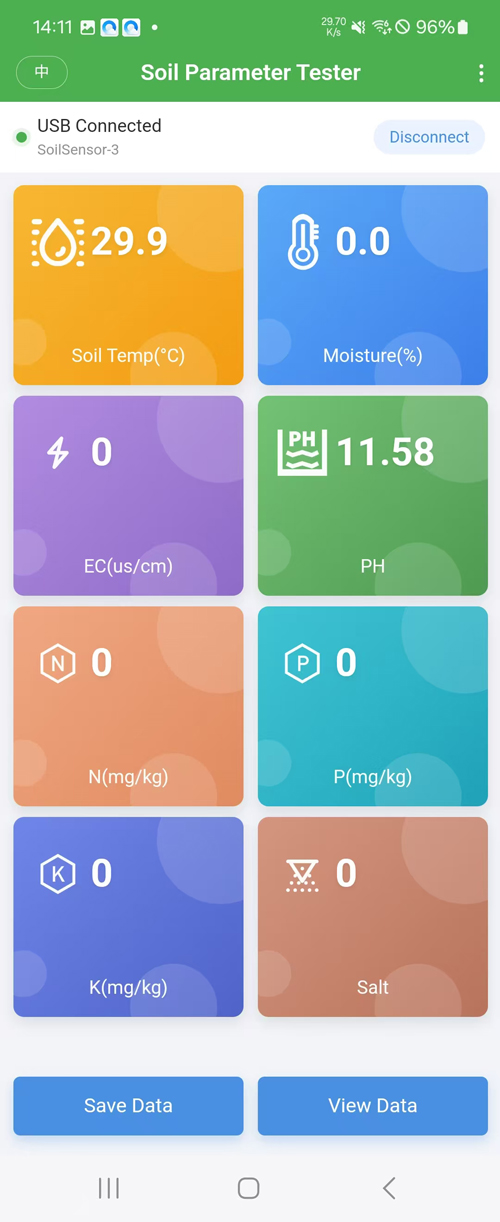
Eight soil parameters are displayed as color-coded cards in the Android app.
How to use the USB soil parameter tester
Check phone compatibility. Use an Android device that supports USB OTG. Install the supplied Android app.
Connect using the USB Type-C data cable. A charging-only cable cannot support communication. Allow USB permission if your phone requests it.
Choose the USB device in the app. Tap Connect Device and select the detected sensor. Confirm that the app reports a connected USB status.
Insert the probes fully into soil. Ensure good contact between the probes and the soil; avoid stones, metal and visible air gaps.
Wait for readings to stabilize. Compare measurements under consistent sampling conditions. Save a record with a sample note, or open history for CSV export.
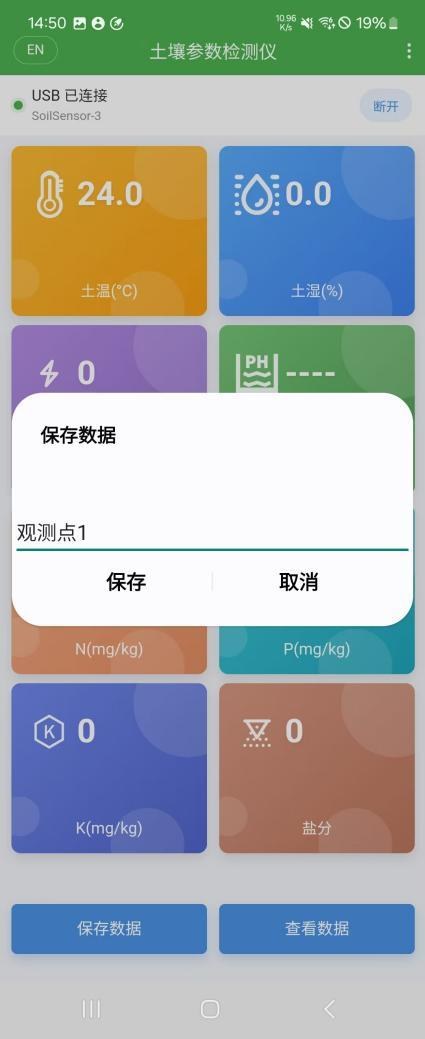
Save a measurement with a sampling-point note for later comparison and CSV export.
For more repeatable comparisons, keep insertion depth, soil preparation and measurement timing consistent between locations. Changes in soil type, water content and compaction can affect the results.
Check soil moisture, temperature, EC and pH at multiple beds or growing zones. Save location notes to support manual comparison and follow-up sampling.
Compare moisture and conductivity at selected points before and after irrigation or during routine field visits. This portable tester is intended for on-site readings, not automatic irrigation control or unattended telemetry.
Use one phone-connected device to gather several indicators from planting beds and nursery soil. The app can retain a limited set of field records for later review.
Show students or field teams how physical soil conditions affect displayed readings. NPK and salinity estimates must be clearly distinguished from independently validated nutrient testing.
| Item | Specification |
|---|---|
| Product type | Portable USB soil parameter tester |
| Displayed parameters | Soil temperature, moisture, EC, pH, N, P, K, salinity |
| Data connection | USB CDC virtual serial port |
| Power input | USB 5 V bus power |
| Recommended operating current | Less than 100 mA |
| Companion app | Android, USB OTG required |
| App interface languages | English and Chinese |
| Typical app data refresh | Approximately every 2 seconds |
| Local history capacity | Up to 200 saved records |
| Data export | CSV, readable in Excel |
| Sharing | Email, subject to network and service configuration |
| Device configuration | Read and set supported correction and NPK coefficients |
| Firmware upgrade | USB upgrade from manufacturer-provided BIN file through app |
| Main controller | GD32F303CBT6 |
| Controller memory | 128 KB Flash / 32 KB SRAM |
| USB interface / electronics protection | Not waterproof; keep dry |
| Sensor measurement ranges, accuracy, IP rating, dimensions | Not specified in the current manual; verification is required for the ordered hardware version |
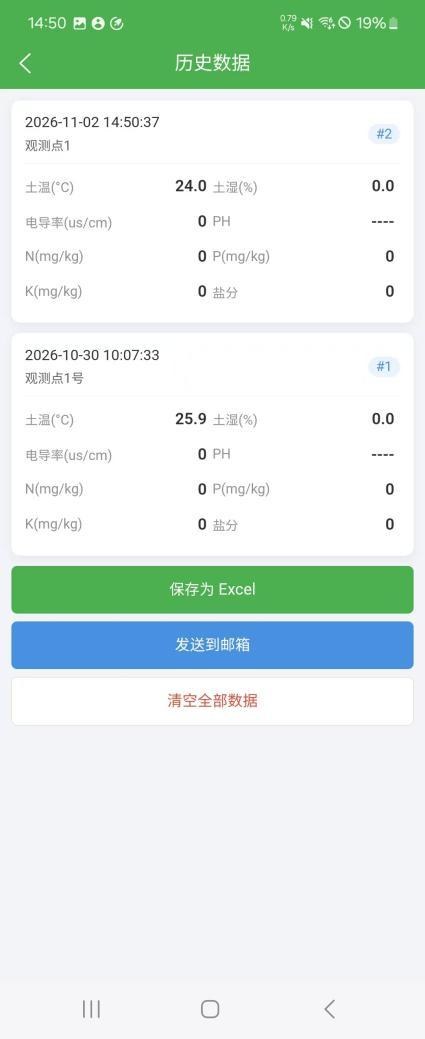
Read supported parameters and review correction or coefficient settings before making changes.
| Item | Quantity |
|---|---|
| USB soil multi-parameter tester with probe | 1 |
| USB data cable for power and communication | 1 |
| User manual (digital or printed) | 1 |
Use the specified USB 5 V supply and a data-capable cable; do not use an over-voltage source.
Keep the USB connector, electronic circuit board and cable junctions away from water or condensation. Do not assume the whole unit is IP68-rated.
Do not strike or bend the probe rods. Remove visible soil residue, rinse the probe sensing area carefully as instructed and dry the device after measurements.
Store in a dry, ventilated place when not in use.
Avoid changing calibration coefficients unless suitable reference conditions and verification procedures are available.
During a firmware upgrade, do not unplug USB or interrupt power. Use only manufacturer-supplied firmware files.
Android app and USB OTG operation. Compatibility is limited to documented Android USB OTG configurations; iPhone support is not.
No separate display or Wi-Fi gateway is required for the documented measurement workflow. The unit operates using USB 5 V power through the connected device. It is a USB-connected tester, not an RS485, wireless or cloud-monitoring station.
No. NPK values are estimates calculated from electrical conductivity and temperature using coefficients. They are suitable for indicative comparisons only and cannot replace laboratory chemical analysis.
Yes. The Android app exports CSV files that Excel can open. The format is CSV, not a native .xlsx workbook.
The app retains up to 200 local history records, including time and notes. Older entries can be removed after the limit is reached, so periodic CSV export is required for longer-term record retention.
“----” indicates that a parameter has no valid output. Review device settings and allow readings to stabilize. For detection problems, check Android USB OTG, use a USB data cable rather than a charging-only cable, grant USB access and reconnect the sensor.
The current manual does not provide an IP rating for the whole device and explicitly warns that USB connectors and electronics are not waterproof. The recommended use is supervised soil testing with dry connectors. Permanent installation requires version-specific environmental specifications and a protected connector and enclosure arrangement.
The app provides access to supported temperature, moisture, EC and NPK coefficients. However, changing these settings affects measurements. Factory or controlled reference calibration procedures should be used where available; do not change coefficients at random.
The ordering specification should define the intended application, quantity, destination country, Android phone model, supplied hardware version, accessories, app compatibility and available technical documents.
Documentation: USB Soil Parameter Tester User Manual (English PDF)
Prev:7-in-1 Portable Soil Tester for pH, EC, NPK & Moisture | NiuBoL
Next:no more
Sensors & Weather Stations Catalog
 Agriculture Sensors and Weather Stations Catalog-NiuBoL.pdf
Weather Stations Catalog-NiuBoL.pdf
Agriculture Sensors Catalog-NiuBoL.pdf
Water Quality Sensor Catalog-NiuBoL.pdf
Related recommendations
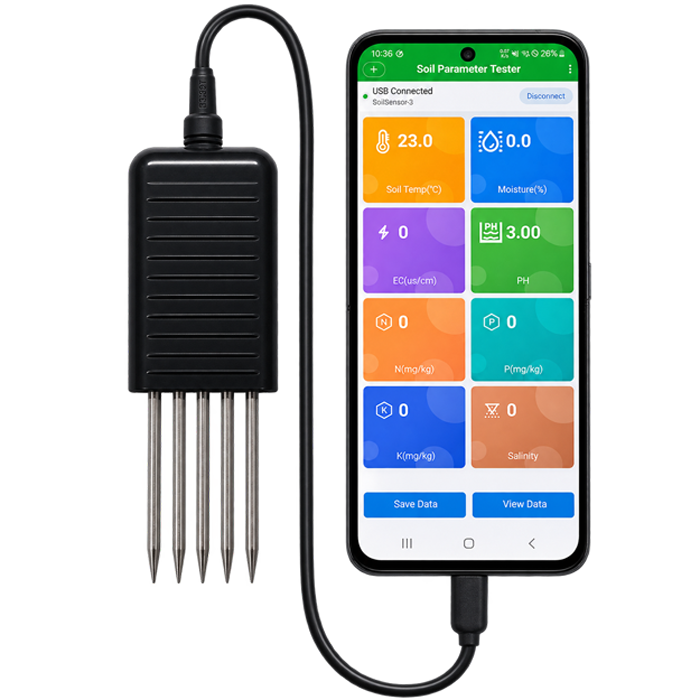 USB Type-C 8-in-1 Soil Parameter Tester with Android App
 7-in-1 Portable Soil Tester for pH, EC, NPK & Moisture | NiuBoL
 Handheld Portable Soil Temperature, Moisture, Conductivity and Salinity Tester
 Hand-held Portable Atmospheric Temperature Humidity air pressure Test instrument
 Handheld High Precision Photovoltaic System Solar Radiation Pyranometer Tester
 Handheld Photosynthetic Active Radiation Tester instruments for Agriculture
Screenshot, WhatsApp to identify the QR code
WhatsApp number:+8615367865107
(Click on WhatsApp to copy and add friends)