

— Blogs —
—Products—
 Consumer hotline +8618073152920
WhatsApp:+8615367865107
Address:Room 102, District D, Houhu Industrial Park, Yuelu District, Changsha City, Hunan Province, China
Product knowledge
Time:2025-01-17 16:36:38 Popularity:1830
Insect monitoring station reports should let the project team trace a reported count back to the station, collection period and original image. Before selecting the platform, define which images, reviewed identifications and operating records the customer can retrieve. A dashboard screenshot alone is not a complete data handover, and automatic image recognition is not a field treatment instruction.
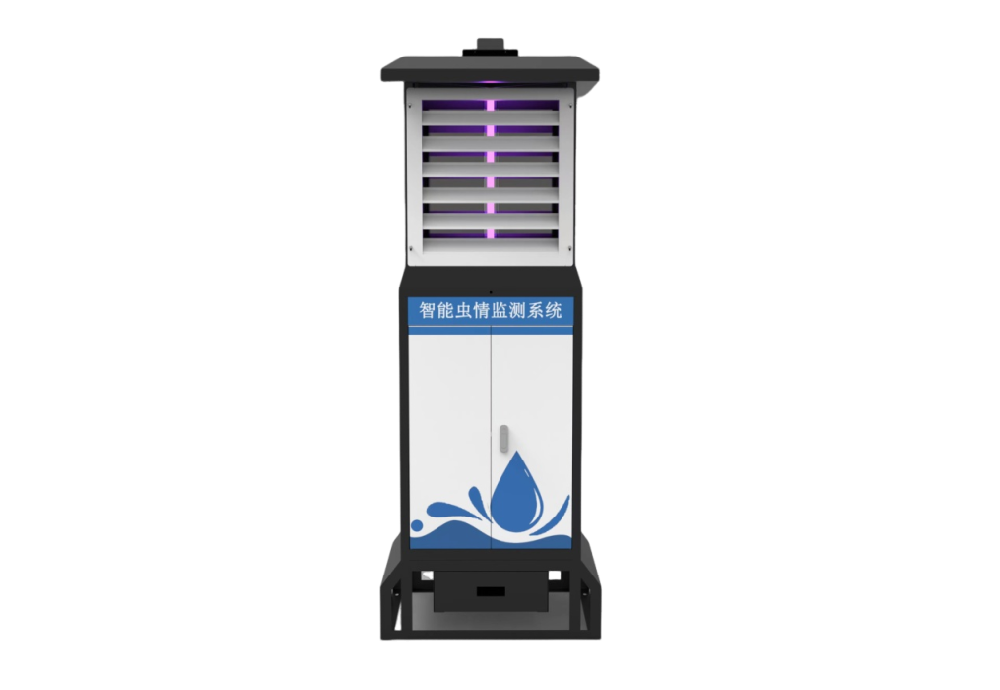
A remote insect station has practical value when staff can inspect observations without collecting every image in person. Agricultural contractors, cooperative projects and research teams may need different outputs from the same device. One needs daily review queues; another needs seasonal records that remain available for later analysis.
The NiuBoL NBL-IoT-SRPMS remote insect monitoring system combines attraction, sample processing, imaging and data transmission. Its physical observation is a sample of captured insects. A species label or count is a further interpretation of that sample, while a crop warning requires additional assessment.
Keep those stages visible in the report. A clearly dated image with a reviewable count is more useful than an unexplained total labeled as pest pressure for the whole farm. The first platform discussion should therefore concern the records needed by the customer's staff, not merely the appearance of a live dashboard.
| Record | Information to define | Reason to keep it identifiable |
|---|---|---|
| Collection and image record | Station identifier, collection period, image time and retrievable image reference | Allows staff to inspect the observation behind a count |
| Identification and count record | Result, review status, reviewer where used and correction history | Separates a machine suggestion from an accepted identification |
| Operating record | Trapping schedule, rain interruption, maintenance and failed or missing image events where available | Helps distinguish reduced collection effort from genuinely lower catches |
Exportable fields and delivery methods depend on the supplied controller and platform. Define which of these records the project needs and demonstrate that they are available. If an operator must enter a field manually, include that task in the reporting workflow.
The camera, light and processing mechanism determine how the sample reaches the imaging stage. They do not by themselves define the customer's retention period, download permissions or identification performance. Check the physical configuration and the reporting service as separate parts of the offer.
| NBL-IoT-SRPMS element | Technical detail | Reporting consequence |
|---|---|---|
| Attraction light | 18 W; wavelength 365-395 nm | The sampling method must suit the target insects; lamp power is not whole-station power |
| Sample processing | Far-infrared heating, 80-90 C processing range | Preparation of captured specimens is not field-wide pest suppression |
| Imaging | 12-megapixel industrial camera configuration | Inspect usable images, not resolution alone |
| Local operation | 10-inch Android touchscreen | Keep local settings consistent with the reporting period being interpreted |
| Data connection | 4G / Ethernet; reserved RS485 / RS232 interfaces | Confirm image delivery and third-party access separately from serial-port availability |
| Power arrangement | AC 220 V or configured solar supply | Define the complete operating load and service scope for the site |
The local control screen is useful for checking operating modes and equipment status. An image of that screen is not proof that a third-party server can retrieve image files or correction history. Demonstrate the required transfer with an actual sample record from the proposed configuration.
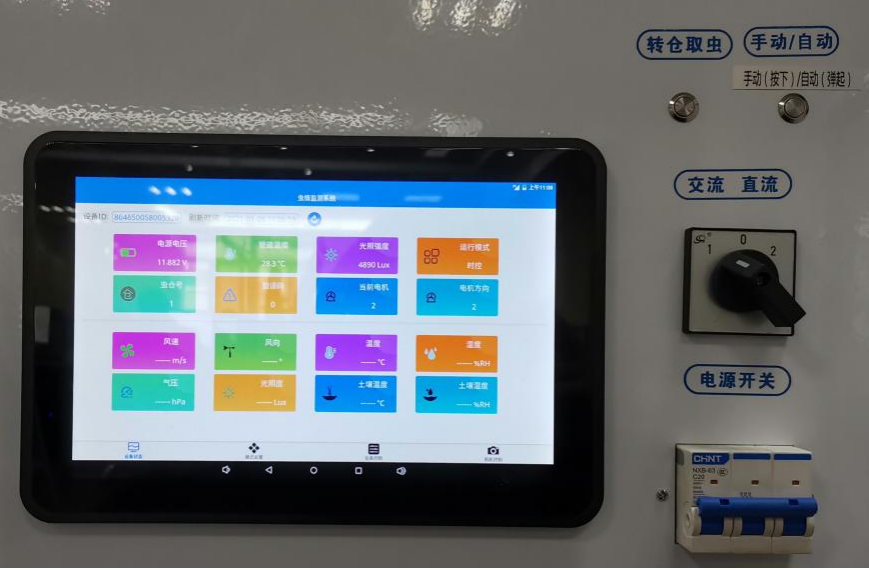
Ask where original images are stored, for how long, and which authorized customer users can retrieve them. Distinguish full image files from thumbnails. If a report contains only an image link, establish whether the link still works after an account change, retention expiry or migration to a different server.
For a contractor handing a system over to an operator, demonstrate a bulk export for an agreed period. It should be possible to associate exported images with their station and time records. A spreadsheet containing counts without corresponding image identifiers may be insufficient when a disputed identification must be checked later.
Do not infer an open API from 4G connectivity, Ethernet or an RS485 port. The available export, API or other transfer mechanism must be identified for the supplied software. If customization is required, define the fields, authentication, responsibility and test dataset before pricing that integration work.
Follow a collection event through to a usable report. Check the station identifier, image time, upload time and count interpretation. These times need not be identical. A delayed upload should not make an older observation appear to have been collected at the time it finally reached the server.
Then test a correction: have the designated reviewer amend a sample identification or count, and check what the operator sees and what an export contains. Determine whether previous results remain traceable. For projects comparing seasons or sites, changes to identification methods should be documented so different result versions are not silently combined.
Finally, test an interrupted observation. Confirm how the reporting system represents a failed image, a service period or rain-controlled operation. If the proposed configuration cannot provide automatic status details, agree a practical operator record. An empty time slot should not automatically become a zero-insect observation.
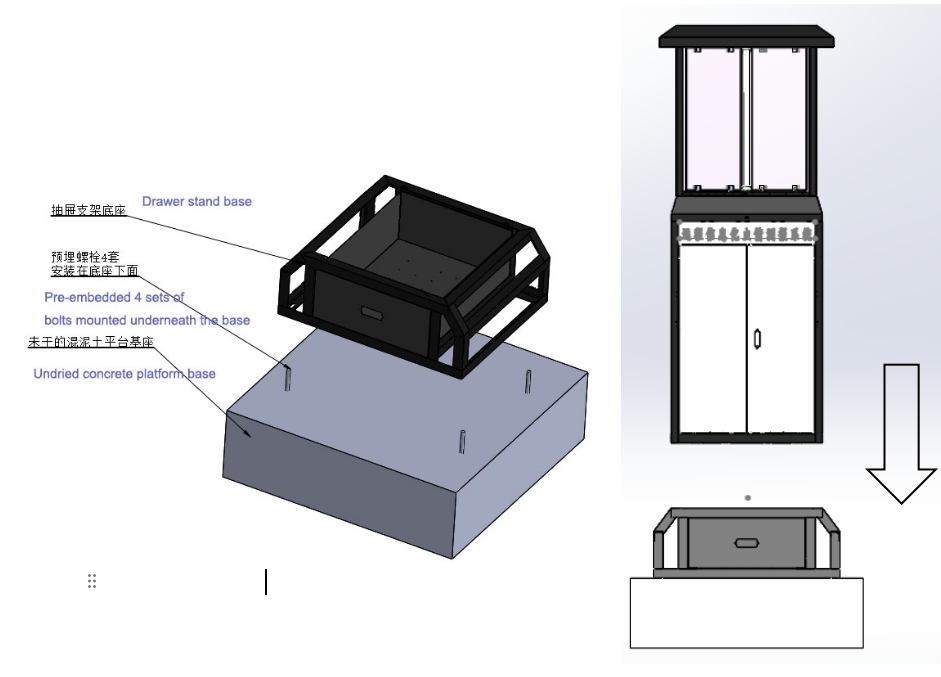
A project can accept successful image collection, record retrieval and delivery to the customer's platform without claiming a quantified yield improvement. Likewise, a complete report does not establish that a light-attracted sample covers every target species or life stage. The insect species coverage guide addresses that separate sampling question.
For a quotation, describe who reviews results, how long records must remain accessible, the expected export and the destination system. Include network availability and the operating season. NiuBoL can then review the station and software configuration against a defined reporting task rather than an unspecified requirement for an intelligent platform.
Also identify ongoing responsibilities: user administration, network service, sample servicing and record retrieval after handover. These affect whether the customer can continue using the information. They should be discussed without assuming free lifetime access, an unlimited retention period or a universal subscription arrangement.
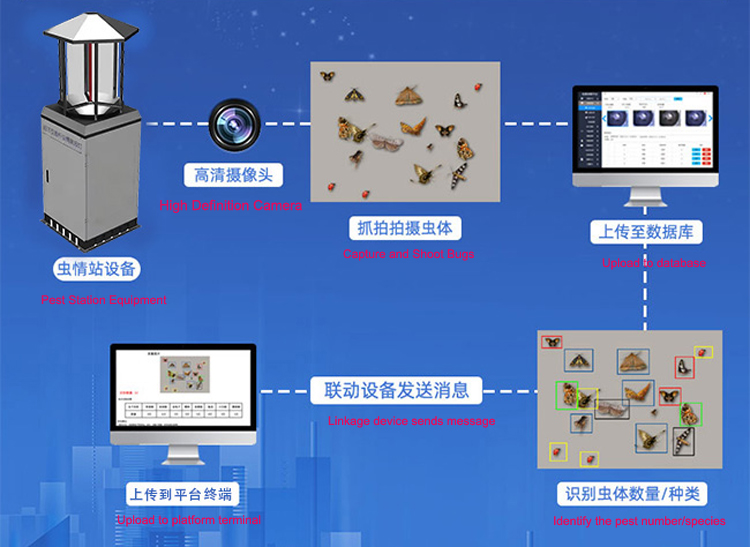
The reported count needs an identifiable station, observation period and accessible image, together with a clear review state. The exact fields and retrieval method should be demonstrated in the offered platform.
No such assumption should be made. Confirm the image export, API or agreed transfer mechanism and test it with the customer's receiving system. Network connectivity alone does not establish data access.
A reserved serial interface is not evidence of a complete image-transfer service. Define which status or scalar data are available through the supported serial protocol, and specify image delivery separately.
Not necessarily. Check whether sampling operated and a usable image was produced, as well as whether the method attracts the target insect. Missing or interrupted observations must remain distinguishable from valid zero catches.
Demonstrate one observation from image collection to retrieval, a reviewed correction, the required export and an interrupted record. Use the proposed hardware and software rather than a demonstration dashboard with unrelated sample data.
The required transfer method, field mapping, retention, user access and receiving-system work affect scope. Request an itemized offer for the station, power arrangement, platform service and any customization; there is no reliable single price for all configurations.
Useful insect monitoring station reports preserve the path from captured sample to image and reviewed result. Define retrieval, retention and export before installation, and verify them with real records. This gives the operator information that remains usable after handover without confusing image collection with a promise of automatic crop protection.
Prev:Rainfall Monitoring for Storm Sampling: Event Triggers and Timing
Next:Piezoelectric Rainfall in Ultrasonic Weather Stations: Model and Data Checks
Related recommendations
Sensors & Weather Stations Catalog
 Agriculture Sensors and Weather Stations Catalog-NiuBoL.pdf
Weather Stations Catalog-NiuBoL.pdf
Agriculture Sensors Catalog-NiuBoL.pdf
Water Quality Sensor Catalog-NiuBoL.pdf
Related products
 Combined air temperature and relative humidity sensor
 TDR Soil Moisture & Temperature Sensor for irrigation| RS485 |4-20mA| NBL-S-THR
 Soil pH sensor RS485 soil Testing instrument soil ph meter for agriculture |NBL-S-PH
 Wind Speed sensor Output Modbus/RS485/Analog/0-5V/4-20mA
 Tipping bucket rain gauge for weather monitoring auto rainfall sensor RS485/Outdoor/stainless steel
 Pyranometer Solar Radiation Sensor 4-20mA/RS485


Screenshot, WhatsApp to identify the QR code
WhatsApp number:+8615367865107
(Click on WhatsApp to copy and add friends)